

In previous posts we have talked about creating a ColdBox module from scratch ( ContentBox - Extending ContentBox 3 with your Own Custom Modules ), one file at a time, to see the minimum files required to make the module work. That was a great educational exercise, but lets look at another way to create a module, with CommandBox's ColdBox scaffholding commands.
The Coldbox command inside of CommandBox allows you to do a lot of things, including coldbox create for all of these items:
- view
- app-wizard
- orm-virtual-service
- unit
- integration-test
- interceptor-test
- orm-entity
- orm-service
- app
- interceptor
- orm-event-handler
- model
- layout
- handler
- bdd
- module
- orm-crud
- model-test
- controller
We are of course interested in creating a module. Lets look at that command
#coldbox create moduleThe params for this command are the following:
- name=
- author=
- authorURL=
- description=
- version=
- modelNamespace=
- dependencies=
- directory=
- script=
There is also a flag for script: --script
Lets create a module with the command, and see what it produces.
Note: Be in the root of your app so the command knows where to put the files. If you are in a subfolder, the command might get lost.
coldbox create module name=customModule2 author="Gavin Pickin" authorURL="http://www.gpickin.com" description="Custom Module 2" version="1.2.3" cfmapping="customModule2Mapping" modelNamespace="customModuleName" directory="modules_app" script=true
Looking at the arguments in more detail
- name=customModule2
- author="Gavin Pickin"
- authorURL="http://www.gpickin.com"
- description="Custom Module 2"
- version="1.2.3"
- cfmapping="customModule2Mapping"
- modelNamespace="customModuleName"
- directory="modules_app"
- script=true
The command outputs this:
Created C:\www\wwwplayground\modules_app/customModule2
Created C:\www\wwwplayground\modules_app\customModule2\handlers
Created C:\www\wwwplayground\modules_app\customModule2\handlers\Home.cfc
Created C:\www\wwwplayground\modules_app\customModule2\models
Created C:\www\wwwplayground\modules_app\customModule2\models\models_here.txt
Created C:\www\wwwplayground\modules_app\customModule2\ModuleConfig.cfc
Created C:\www\wwwplayground\modules_app\customModule2\views
Created C:\www\wwwplayground\modules_app\customModule2\views\home
Created C:\www\wwwplayground\modules_app\customModule2\views\home\index.cfm
Here is a visual display of the directory structure
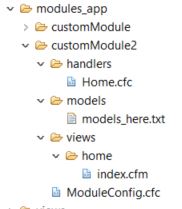
You can see it creates a Module Config file with all your information ( click here to view the GIST ).
It creates a default handler, called Home.cfc in the handlers folder.
It creates a models folder, with just a placeholder file.
It creates a views folder, with the 'home' folder to match the handler, and creates a default index.cfm view.
It is a great way to get started. You can use many of the other coldbox commands to create additional handlers, views, layouts.
So next time you want to create a module, instead of remembering the conventions, and what files you need... just scaffold it with commandbox's coldbox create command.
Remember, these modules all work great with ContentBox, so what will you create?


Add Your Comment
(1)
Aug 09, 2016 08:16:13 UTC
by Dan OKeefe
When using commandbox to scaffold a module in contentbox, you would need to be in the root of the contentbox module for module_user?